Soil balance fertilizer calculator
Fertilize to balance the soil, not just to replace what the crop removes.
Most fertilizer plans start from N-P-K removal and a standard rate. The SoilBeat calculator starts from the soil: it reads your soil test, balances calcium, magnesium, potassium and sodium, subtracts what legumes and cover crops already supply, and turns the gap into a costed plan with your own products.
Included in Farmer Pro and Advisor · Reads Mehlich III, Ammonium Acetate and Morgan soil tests
The usual fertilizer plan
Why most fertilizer plans miss what the soil needs
Most plans answer one question: how much N, P and K will this crop remove? That leaves out the soil itself, and what is already on its way to the crop.
N-P-K is only part of the picture
Removal-based plans skip the ratios between calcium, magnesium, potassium and sodium. Those ratios shape soil structure, pH and how well the crop can take up what you apply.
One rate for every soil
Generic recommendations ignore soil texture and what the test already shows. Sand, loam and clay need different amounts to reach the same target.
Paying twice for nitrogen
Nitrogen from a previous legume or cover crop is rarely counted, so the plan buys nitrogen the field already has.
A spreadsheet per zone
Agronomists copy lab results into Excel, convert units and rebuild the balance sheet for every zone and every client. It is slow and easy to get wrong.
Applying more doesn’t fix an imbalance. A plan built on the soil’s own numbers puts each kilo where it makes a difference.
SoilBeat guides you in six clear steps from soil test to a complete fertilization plan:
- 11. Start
Set context
- 22. Nutrients now
See current state
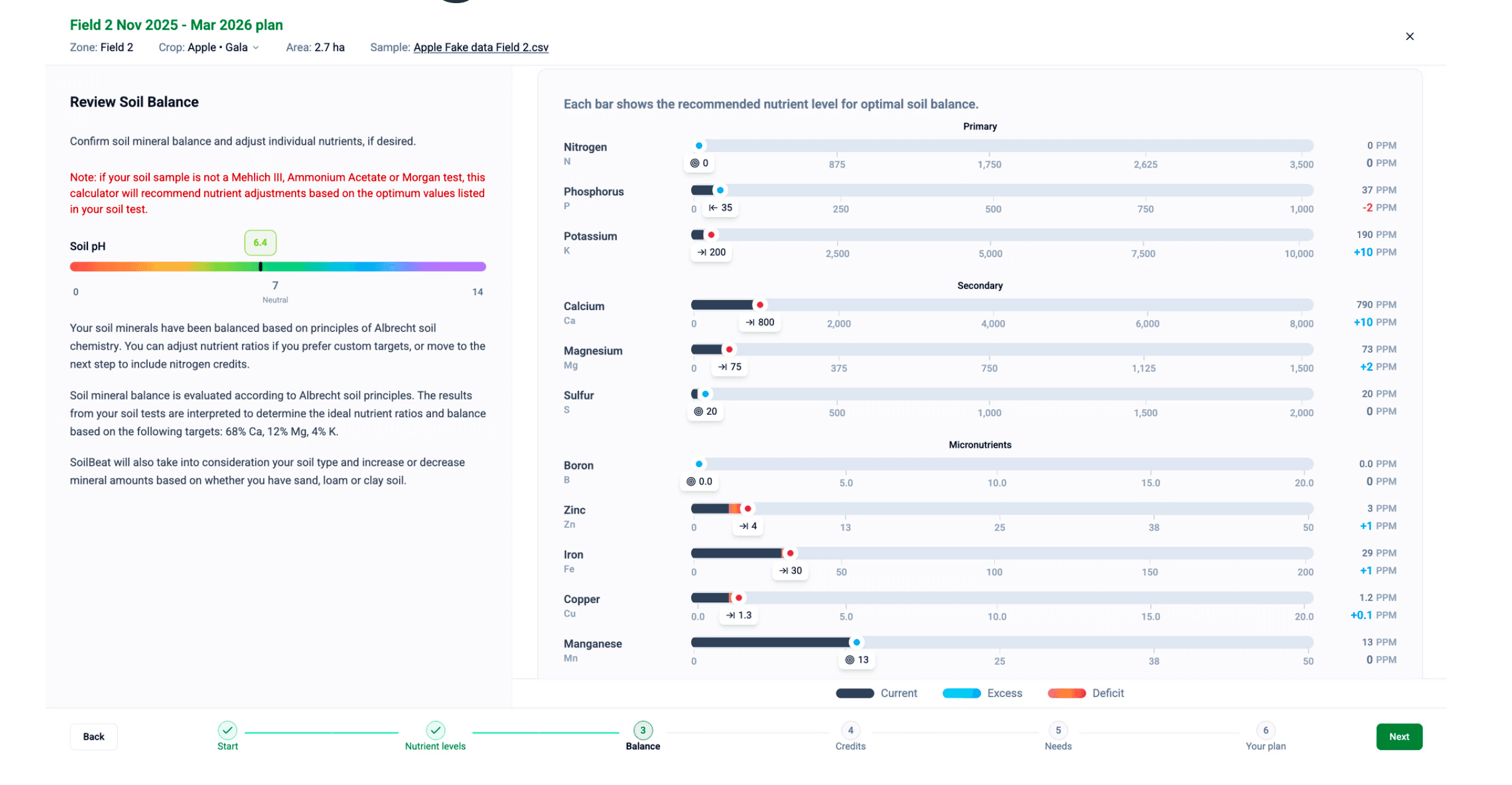
- 33. Balance
Optimise mineral ratios
- 44. Credits
Define nutrient credits
- 55. Plan for Yield
Match supply to crop needs
- 66. Plan
Optimize for costs or soil balance
How it works
From soil test to a costed fertilizer plan in six steps
The calculator takes you through the plan step by step. You can change every target along the way.
Set your context
Select the field or management zone, link the latest soil sample, choose the season dates and soil type, and name the plan.
See where you stand
The calculator reads your lab results, converts them to ppm and shows each nutrient against its target range.
Balance minerals and pH
Based on Albrecht base saturation, SoilBeat calculates what it takes to reach your target ratios and pH. Start from the default targets or set your own.
Count what the soil already supplies
Add nitrogen credits from a previous legume or cover crop, so the plan doesn’t buy what the field already has.
Match crop demand
Choose the next crop and expected yield. The calculator works out the total requirement and flags the deficit for each nutrient.
Turn it into a product plan
Convert the needs into a season-long plan with your own products: rates, timing, amounts per hectare and in total, optimized for price or ease of handling.
You set the targets and approve every plan. The calculator does the arithmetic for each management zone.
What it gives you
Better-balanced soil, fewer wasted inputs
For agronomists
One method for every client and every management zone, with your own target ratios. No more rebuilding balance sheets in Excel, and every plan stays connected to the field’s history.
For growers
A season-long plan built from the products you can actually buy, with rates, timing and cost per hectare. You see why each product is in the plan before you order.
Included in Farmer Pro and Advisor
Farmer Pro (€449 per year) for growers planning their own farm, Advisor (€995 per year) for agronomists managing up to 20 farms. Start free and upgrade when you’re ready to build plans.
Questions about SoilBeat
What should I know before starting?
What is soil balance fertilization?
An approach based on the work of William Albrecht. It looks at base saturation: the share of the soil’s exchange capacity taken up by calcium, magnesium, potassium and sodium. The plan moves those ratios and the pH towards your targets, alongside the nutrients the crop needs. Learn more about soil analysis.
Do I need a soil test for every zone?
For the balance calculation, yes: it needs a recent soil test for the zone. Without one, you can still build the plan on crop needs, expected yield and nitrogen credits, and add the balance when the next test comes in. Compare soil, tissue and sap analysis.
Which soil tests does it read?
The calculator converts results from Mehlich III, Ammonium Acetate and Morgan tests to ppm. SoilBeat reads lab reports as PDF, CSV or Excel, from more than 100 lab formats. Check supported lab reports.
Can I use my own target ratios?
Yes. The default targets are 68% calcium, 12% magnesium, 4% potassium and 1.5% sodium. You can change them, and the target pH, to match your own strategy. See how recommendations work.
Does it count nitrogen from cover crops?
Yes. Add nitrogen credits from a previous legume or cover crop, and the calculator subtracts them from the crop’s requirement. Read the buyer’s guide to fertilizer software.
Which products can I use?
Your own product list. The calculator converts nutrient needs into product rates and timing, can optimize for price or ease of handling, and shows for each nutrient whether you end up short, on target or over. See how advice becomes tasks.
What does it cost?
The calculator is included in Farmer Pro (€449 per year) and Advisor (€995 per year). You can start with a free account and upgrade when you’re ready to build plans. See all plans.
Related pages
Explore more
SoilBeat for agronomists
Better recommendations with less admin, using your own methods.
Fertilizer recommendation software
What to look for in software for fertilizer plans, and how SoilBeat does it.
Manure calculator
Plan slurry and manure per field and per cut on Dutch dairy farms.
Soil analysis
Testing and extraction methods, and how to read a soil report.
Build your next fertilizer plan on the soil’s own numbers.
Book a 30-minute demo and bring a recent soil test.