01Recommendation
PlantSap
ANSWERSWhat is happening in the plant now, and what needs correcting?
USESYoung + old leaf sap results, crop stage, observations and history.
OUTPUTIn-season nutrient correction plan
SoilBeat connects agronomic data, analytics, decision logic, recommendations and field execution in one workflow. Explore the capabilities — and the different recommendation types built for different questions.
The pieces work together: bring evidence together, understand what is changing, choose the right recommendation approach, review it and connect it to what happens in the field.
Turn reports and field information from different sources into structured agronomic data that can be compared and connected to the right farm, crop and management zone.
Import PDF, CSV and XLS lab reports from multiple sources.
Structure soil, plant sap, tissue, water, silage, manure and fungi results.
Normalise nutrients and units for comparison.
Connect samples to farms, fields, crops and management zones.
Keep observations, activities, yields and growing history with the record.
Maintain personalised fertiliser and crop-protection product libraries.
Compare measurements over time and against field events so you can investigate what changed and where attention is needed.
Customise nutrient graphs and comparisons.
Compare nutrients by crop, zone, test type and date.
Track plant-sap results over time.
Place lab results alongside fertilisation and field events.
Use connected observations and history when interpreting results.
Investigate patterns with Pulse across connected data.
SoilBeat is not one generic AI recommendation. Different agronomic questions need different evidence, logic and outputs. Start from the goal, then build the recommendation around the relevant data.
Goal-specific recommendation templates.
Evidence selected from the connected farm record.
Deterministic agronomic calculations where required.
AI-assisted interpretation and drafting.
Editable products, rates, timing and wording.
Human review, approval and publishing before advice reaches the grower.
The recommendation type determines the question, evidence, agronomic logic and practical output. It is not simply a different prompt.
What is happening in the plant now, and what needs correcting?
USESYoung + old leaf sap results, crop stage, observations and history.
How should soil nutrient balance be addressed across the season?
USESpH, base saturation, mineral balance, crop needs and history.
What base fertilisation does this field need?
USESSoil test, crop needs and yield targets.
How can available manure be used appropriately?
USESManure nutrient value, field need, timing and application limits.
Where can synthetic N be reduced without simply reducing yield ambition?
USESCrop demand, existing nutrient supply, history and planned applications.
What can improve uptake, retention and crop resilience?
USESWater information, plant status, field context and management history.
What pest or disease problem needs attention, and what should happen next?
USESFieldScout observations, photos/videos, crop context and history.
Where can input spend be reduced while still addressing the agronomic need?
USESNutrient targets, product library, rates and product costs.
What should we do about this specific agronomic problem?
USESSelected evidence from the farm record and the advisor's question.
The recommendation layer combines SoilBeat's agronomic intelligence with structured data. Where a specialist needs proprietary targets, rules or calculations, those can be added without turning everything into generic AI.
SoilBeat-authored agronomic logic.
Deterministic calculations for repeatable numbers and rules.
Agronomist-authored proprietary targets, norms and calculations.
AI pattern recognition across structured farm evidence.
Specialist recommendation modules for repeatable methodologies.
Human review remains part of the workflow.
A recommendation should not end as a PDF. Publish the prescription into the grower's workflow so the people responsible know what needs doing — and keep the result for the next decision.
Shared farm workspaces for agronomists and growers.
Publish fertilisation and crop-protection prescriptions into Activities.
Assign and track field work and follow-up.
Capture observations and field reality after recommendations.
Keep advice, action and history connected.
Support shared accounts and permissions.
Pulse is the open-ended layer inside SoilBeat. Use it to investigate, compare and connect information you have already structured — then move from an answer toward a recommendation when useful.
Ask questions across lab reports, observations, activities and history.
Compare farms, fields, zones, crops and dates.
Investigate nutrient interactions and changes over time.
Connect field observations with measurements and interventions.
Use Pulse to explore before creating a structured recommendation.
Keep open-ended exploration separate from the controlled recommendation workflow.
Generic AI can help explore information. SoilBeat connects structured farm data, agronomic logic and a controlled recommendation process so the output can be reviewed, edited and turned into action.
Explore the platform, compare recommendation workflows or talk to us about a more specific setup.
GEBOUWD VOOR GROEI

Agronomist, independent
I started to add lab reports to Chat and then Claude. It all looked super promising, but it frankly became a mess. I feel that with SoilBeat we get the best of both worlds; a platform that organises all my data, that enables me to collaborate and that provides me with AI horsepower to do better analytics.
Beyond just Chat
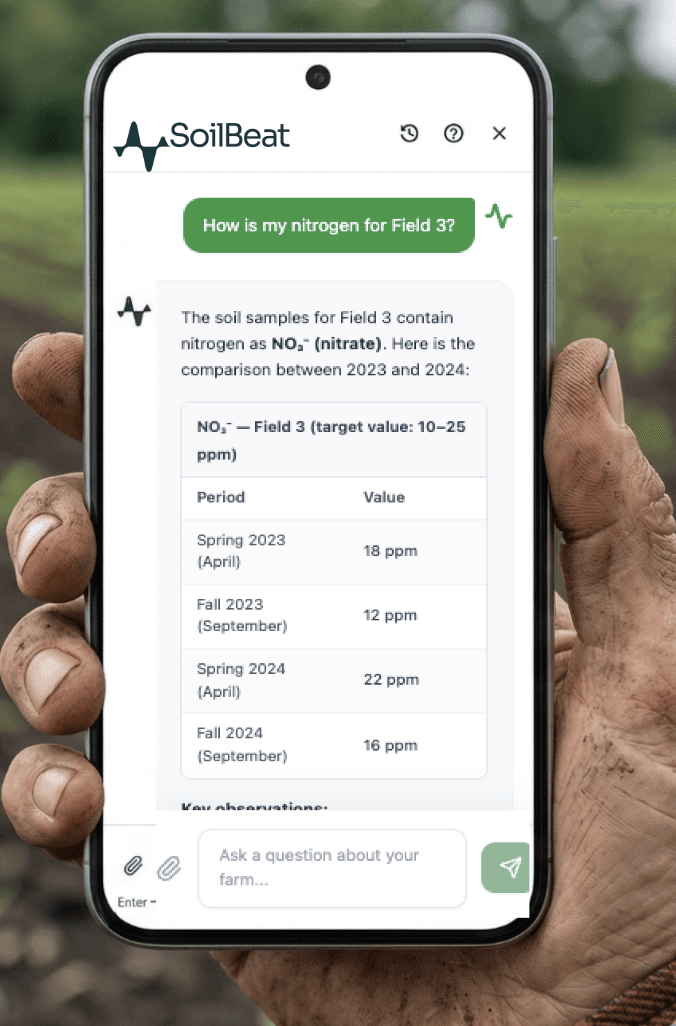
General chatbots give you text. Pulse reads your structured data, runs calculations, and creates records inside SoilBeat — from the conversation.
Tell Pulse what to do, and it does it inside SoilBeat.
Analyze samples
Pulse compares your lab results against targets, identifies deficiencies, and surfaces nutrient interactions — structured as an attention table.
Create analytics filters
"Show me K trends for my potato fields" — Pulse applies the right filters directly in your Analytics view.
Create management zones
Securely migrate historical data and enjoy peace of mind with advanced data vaults.
Import fertilizers and crop protection from files
Upload a product list and Pulse parses and registers them into your catalog automatically.
Create activities and field scouts from conversation
"Log a foliar spray on Field 3 today" — Pulse creates the activity record with the right product, zone, and date.
Voice Recording
Record your notes, actions and observations in the field. Pulse converts speech to text and responds — no typing needed on mobile.
Every answer draws from your live, structured SoilBeat records.
Management Zones
Reads and creates zones, subzones, and field boundaries.
Lab Reports
Accesses all lab data — soil, sap, tissue, PLFA, biology — with zone, crop, and date context.
Fertilizers & Crop Protection
Reads your product catalog and creates new entries from conversation or file uploads.
Activities & Field Scout
Reads scheduled tasks and field observations. Creates new entries from chat.
Farms, Crops & Harvests
Knows which farms, crop rotations, and harvest records belong to your account.
File Uploads in Chat
Drop a product list, crop rotation file, or lab report directly into the Pulse chat. It parses, structures, and creates the records for you.